
Cute Gaming Headsets: What Actually Matters Before You Buy
The problem with shopping for a cute gaming headset is that cuteness is the only quality you can judge from the product photo, and it is close to the least important one. The cat ears are adorable in the listing and irrelevant by week two. What decides whether you love or abandon a headset is a list of unglamorous things: whether the clamp force gives you a headache by hour two, whether your friends hear you clearly or hear you through a wall, whether the volume you play at is quietly costing you hearing over years of sessions, whether the battery dies mid-raid because of how it has been charged, and whether the wireless that works beautifully on your PC does anything at all on your console. None of that is visible in the photo, and all of it is knowable before you buy. This guide works through the checks in the order they matter — hearing safety first, because it shapes how loud you need a headset to be; then fit, microphone, connection, and battery; then the cute layer, which turns out to be easy to add once the foundation is right. The goal is a headset you would buy again with the ears removed, wearing ears you actually like.
Start here: New here? Begin at the GamerChicksRule home page for the latest guides, and use the checks below before you fall for any headset’s product photo.
Key Takeaways
- Volume discipline matters more than volume power: health authorities converge on keeping listening at or below about 60 percent of maximum and treating 85 decibels as the line where exposure time starts to shrink fast.
- A well-fitted, sealed earcup lets you play quieter, because you are not fighting room noise — fit is a hearing-safety feature, not just comfort.
- Microphone quality is mostly geometry: a boom that places the mic near the corner of your mouth beats a hidden mic every time, whatever the spec sheet says.
- Compatibility is a checklist, not a hope: confirm your exact platform’s headset requirements before buying, because PC, Xbox, and PlayStation each handle audio differently.
- Battery life is partly something you control — partial charges and avoiding heat and constant full-charge storage measurably extend a lithium battery’s life.
- Buy the sound and fit first, then add cute: ears, covers, and charms are accessories, and accessories can be replaced when your taste changes.
Table of Contents
- Start With Your Ears: Volume Is a Budget
- Fit: The Headache Test Nobody Runs
- The Microphone: Where Cute Headsets Quietly Fail
- Wired, Wireless, and What Your Platform Allows
- Battery Life Is Partly Your Own Behavior
- Sound Signatures, Drivers, and Spec-Sheet Theater
- Adding the Cute Layer Last
- Our View
- FAQ
- Sources
- Recommended
Start With Your Ears: Volume Is a Budget
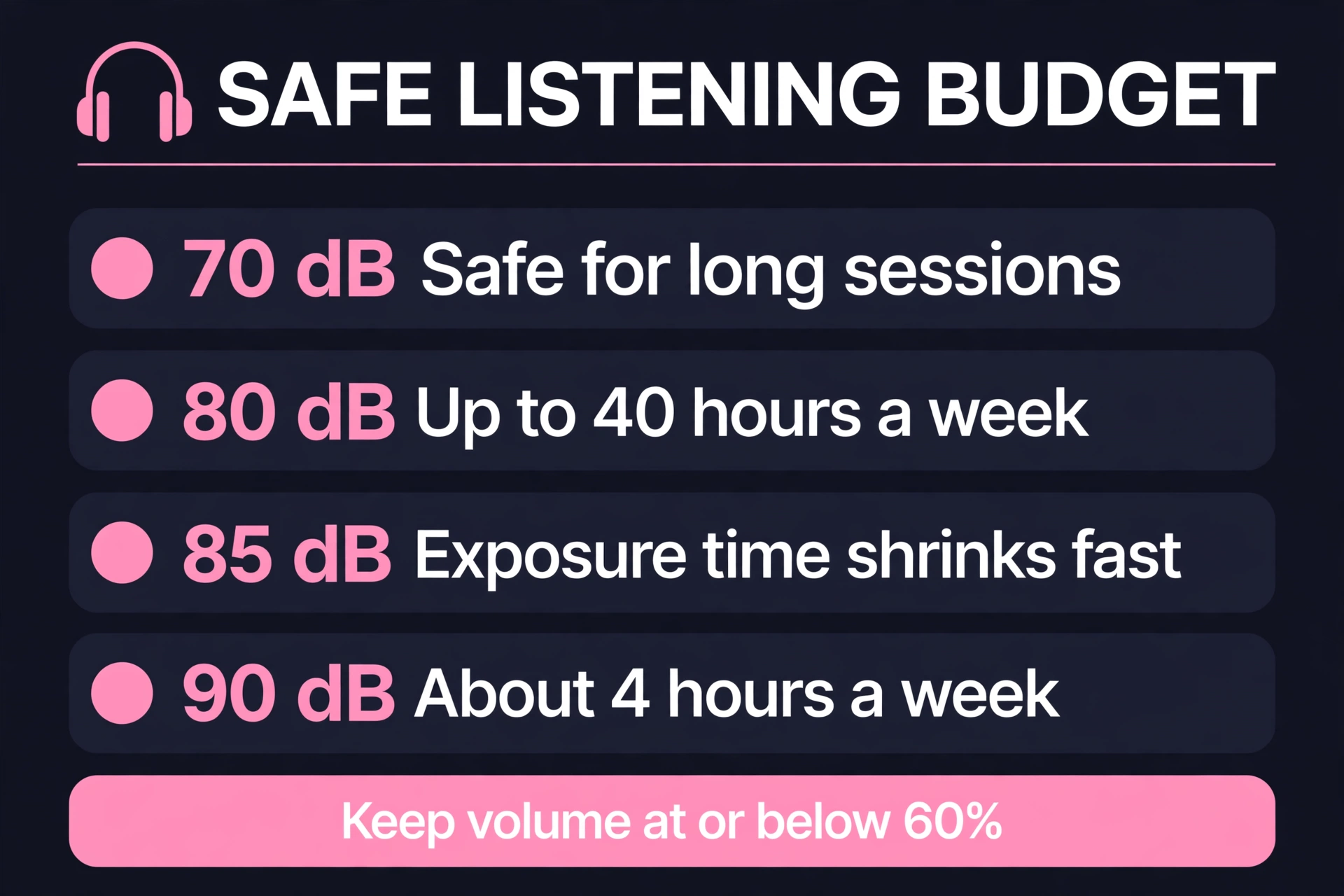
The most important specification on any headset is one you set yourself: how loud you listen, for how long. Hearing damage from sound is a dose — level multiplied by time — and it accumulates silently. The World Health Organization’s safe listening guidance puts concrete numbers on it: a sound level of 80 decibels can be listened to safely for up to 40 hours a week, while at 90 decibels the safe time collapses to about four hours a week, and its practical advice for device users is to keep volume at no more than 60 percent of maximum. The U.S. National Institute on Deafness and Other Communication Disorders explains the mechanism in its overview of noise-induced hearing loss: sounds at or below 70 decibels are unlikely to damage hearing even over long exposure, but long or repeated exposure at or above 85 decibels can, because the hair cells in the inner ear that convert sound into signals are damaged permanently and, in humans, do not grow back.
Workplace research lands in the same place, which is reassuring because it comes from decades of measurement rather than opinion. OSHA’s noise exposure overview describes hearing conservation requirements kicking in at 85 decibels as an eight-hour average, and NIOSH — the research arm whose recommendations OSHA’s page points to — sets its recommended exposure limit at the same 85-decibel average, with the brutal arithmetic that every 3-decibel increase halves the safe exposure time, as the CDC’s NIOSH noise page lays out. The American Speech-Language-Hearing Association’s noise prevention guidance adds the everyday translation: if you have to raise your voice to be heard over the sound, or your ears ring or sound muffled afterward, the sound was too loud. Gamers should take the ringing warning personally. Mayo Clinic’s tinnitus overview notes that tinnitus — ringing or buzzing that is not coming from an external source — is commonly tied to hearing loss from noise exposure, and that about nine of ten people with tinnitus have some noise-related hearing loss. A headset session that ends with ringing ears is not a sign of an immersive night. It is a receipt for damage.
| Listening level | What the guidance says |
|---|---|
| Around 70 dB or below | Unlikely to damage hearing even over long exposure (NIDCD) |
| 80 dB | Up to about 40 hours per week considered safe (WHO) |
| 85 dB | Workplace action level; safe time shrinks quickly above this (OSHA / NIOSH) |
| 90 dB | About 4 hours per week considered safe (WHO) |
| Device rule of thumb | Keep volume at or below 60 percent of maximum (WHO / ASHA) |
This is why the search for a headset should start with a question most buyers never ask: how quiet can this headset let me play? A headset that seals well and blocks some room noise lets you hear footsteps and dialogue at a lower volume than an open, leaky one that forces you to crank the level to compete with your household. Noise cancellation, good passive isolation from a proper earcup seal, and a volume limiter or monitoring feature are not luxury extras for a gaming headset — they are the features that decide whether your hobby costs you hearing over a decade of playing it. Buy for quiet competence first, and the loudness you need will take care of itself.

Fit: The Headache Test Nobody Runs
Comfort is a measurement problem disguised as a feeling, and the feeling only shows up after the return window starts closing. The three numbers that predict it are weight, clamp force, and earcup volume, and only one of them appears on most spec sheets. Weight is the honest one: a heavier headset can be perfectly comfortable if its headband distributes the load across a wide, padded band, and miserable if it concentrates the same grams on two pressure points. Clamp force is the silent one — the squeeze that holds the headset on also presses on the jaw hinge and the glasses arms, and it is why a headset that feels snug and secure in a five-minute try-on can produce a headache at hour two. If you wear glasses, this is your single most important check: thinner, flexible frames and earcups with a glasses channel or softer foam at the temple point are worth more than any audio feature, because a broken earcup seal costs you bass and isolation at the same time as it costs you comfort.
Earcup volume is the third number, and it is the one cute headsets most often sacrifice. Ears need a cavity, not a cushion pressed against them; if your ear touches the driver housing or folds against the cup wall, you will feel it within the hour, and smaller-headed buyers — the exact audience most cute headsets are marketed to — are often handed scaled-down cups that assume smaller ears to match, which does not follow. Measure your current most comfortable headset’s inner cup dimensions if you have one, and treat those as your minimums. Headband adjustment range matters in the other direction too: a headset that only fits at the very end of its adjustment has no room left for a hairstyle, a headband underneath, or the ears and accessories you may add later. Fit is also where trying before committing pays for itself — wear any candidate for a full session-length test during the return window, not for ten minutes, because every fit failure in this section is a slow one.
The Microphone: Where Cute Headsets Quietly Fail
Your audience for the microphone is not you, and that is why bad mics survive product testing — the buyer never hears the purchase the way their friends do. Microphone quality in a headset is governed first by distance. A boom microphone that ends near the corner of your mouth captures your voice loudly and clearly relative to everything else in the room, which lets the system keep its gain low and your keyboard, fan, and household quiet by comparison. A microphone hidden in an earcup, however clever its processing, is capturing your voice from beside your ear, at low level, mixed with every other sound in the room at a similar level — and no processing fully recovers from that geometry. If you stream, take calls, or play team games where callouts matter, a real boom — detachable if you want the clean look off-duty — is the single feature most worth protecting in your budget. If your use is solo gaming and the occasional chat, an inline or earcup mic may be a fair trade, but make it a knowing one.
The second mic check is what your platform does with sidetone and monitoring. Hearing your own voice in your ears at a natural level stops the slow volume creep where you talk louder and louder over a long session because you cannot hear yourself — a small feature with an outsized effect on both your voice and your friendships. Before buying, the practical test is simple and almost nobody does it: record yourself. Use a candidate headset, or check recordings and mic samples from reviewers using the same model, and listen for the three failures that matter — a thin, distant voice (distance problem), constant background wash (gain problem), and popping on plosives (positioning problem, usually fixed by moving the boom slightly below and beside the mouth rather than directly in front of it). A headset that passes those three with your actual voice, in your actual room, has a good microphone for you regardless of what any frequency chart claims.
Wired, Wireless, and What Your Platform Allows
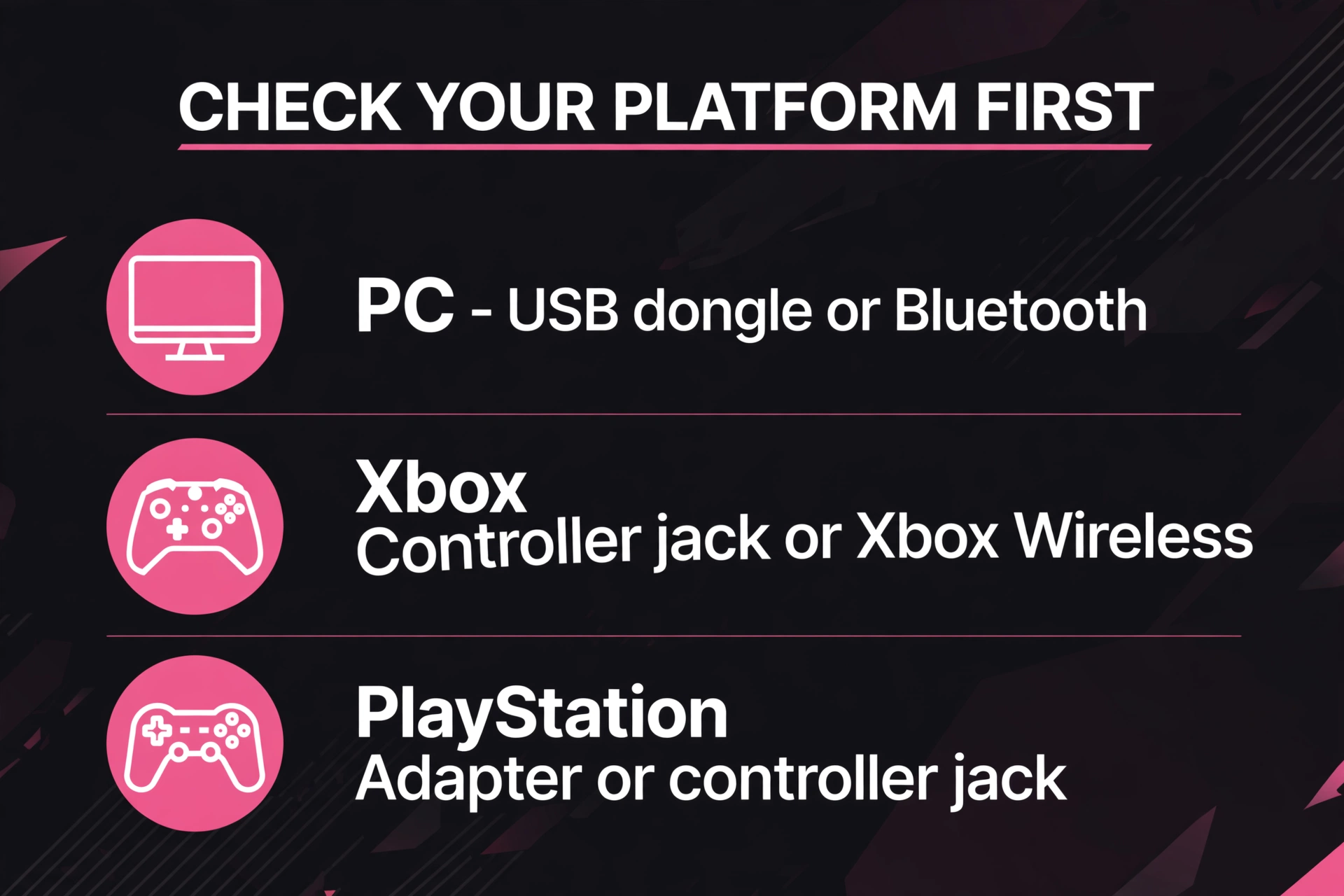
Compatibility is the least cute topic in this guide and the one most likely to turn a purchase into a return. The three main platforms handle headset audio differently, and a headset that is flawless on one can be limited or silent on another. Xbox’s own support documentation on connecting a compatible headset walks through its specific routes — the 3.5mm jack on the controller for wired headsets, and Xbox’s own wireless protocol for the headsets built to use it — which is a different wireless world from the USB dongles and Bluetooth that PC buyers take for granted. PlayStation’s support guidance on pairing a headset likewise describes its supported paths, centered on its own wireless headsets and adapters plus wired connections through the controller. The rule that falls out of both documents is the rule for this whole section: before buying any headset, find your exact platform on the manufacturer’s compatibility list, and treat “works with” claims from marketplace listings as advertising until the platform holder’s own documentation agrees.
Within wireless itself, there are two different technologies wearing the same name. A dedicated 2.4GHz dongle connection is built for low delay, which is what gaming asks for; standard Bluetooth is built for convenience, and its delay can be noticeable in fast games even when it sounds fine for music and video. Bluetooth’s own next generation is aimed squarely at this gap: the Bluetooth SIG’s overview of LE Audio describes its new LC3 codec delivering higher quality at lower data rates — with listening tests showing improvement over the older SBC codec even at half the bit rate — plus multi-stream audio for better handling of multiple devices. That is promising and increasingly available, but it only helps when both the headset and the device support it, which returns us to the checklist: confirm the codec and connection your platform actually uses, not the best one the headset owns. Wired, finally, remains the undefeated option on reliability — no battery, no pairing, no delay worth naming, and a cable that can be the failure point instead of the whole headset. Plenty of experienced players keep a wired headset as the home base and treat wireless as the upgrade for moving around, which is a sensible order of operations.

Battery Life Is Partly Your Own Behavior
The battery hours printed on the box describe a new battery treated well, and both halves of that sentence are partly up to you. Wireless headsets run on lithium-ion batteries, and lithium batteries age by chemistry, not just by use. Battery University’s long-running reference on prolonging lithium-based batteries documents the patterns that matter for a headset owner: partial discharges are gentler than full ones, so charging more often in smaller amounts beats running the battery to empty; heat is a primary enemy, with capacity loss accelerating at elevated temperatures; and a battery kept sitting at a full charge ages faster than one stored at a partial charge. Translated into headset habits, that means three things. Do not leave your headset plugged in on the charger as its permanent home — charge it, use it, and let it live in the middle of its range. Do not store it in a hot car or on a sunny windowsill between sessions. And when a headset will sit unused for weeks, leaving it around half charged is kinder than topping it off first.
The practical buying advice follows from the same facts. Treat headline battery life as a best case that will shrink over the headset’s life, so a model whose new-battery life only just covers your longest sessions will not cover them in year two — buy headroom. A headset that can be used wired while it charges, or that charges over a standard cable you already own, converts a dead battery from a session-ender into a minor inconvenience, and that resilience is worth real money. And when a listing advertises a spectacular battery figure, check what it assumes: figures are commonly measured at moderate volume with lighting and extra features off, so a headset with RGB ears glowing at full volume is living a different life from its spec sheet. None of this requires babying the device — it requires knowing that the battery is a consumable on a clock, and choosing the model and habits that make the clock run slowest.
Sound Signatures, Drivers, and Spec-Sheet Theater
Driver size is the number headsets advertise because it is the number buyers can compare, and it predicts less about sound than almost anything else in the design. A larger driver can move more air, but what you actually hear is the tuning — the balance the maker chose between bass, midrange, and treble — filtered through the earcup’s seal on your particular head. For gaming, the tuning that serves you is one where the midrange stays clear, because dialogue, callouts, and the directional cues you play by live there, while exaggerated bass feels cinematic for an evening and then spends a year muddying footsteps. This is also why surround claims deserve a calm reading: virtual surround processing can widen the sense of space, but the positional information in a game comes from the game’s own audio mix delivered cleanly to two ears, and a well-tuned stereo headset routinely out-plays a poorly tuned surround one. If a headset offers an equalizer through its app, that is genuinely useful — not for chasing a perfect curve, but for trimming the one excess your games expose, whether that is boomy explosions or harsh treble.
The honest way to judge sound without instruments is structured listening. Pick two or three pieces of audio you know deeply — a game scene you have played for dozens of hours is better than any test track — and compare candidates on the same material at matched volume. Listen for whether voices stay intelligible under game noise, whether quiet directional sounds survive, and whether anything fatigues you over twenty minutes, because listening fatigue is a tuning flaw you will pay for every session. Reviews help most when they describe the signature in words — warm, bright, bass-heavy, flat — that you can map to your own preference, and least when they rank headsets by driver diameter. Your ears, your games, and your volume habits are the test bench; the spec sheet is only the entry ticket.
One more practical system deserves a paragraph before the cute layer, because it quietly shapes daily use: controls and connections you touch every session. Volume and mute should be reachable without looking — a wheel or button you can find by feel on the earcup, or an inline control that sits where your hand expects it — because a control you have to hunt for is a control you will operate by taking the headset off, and a headset that comes off mid-session is one you will eventually stop putting on. Chat-mix control, the balance between game audio and voice chat, is the other daily-use feature worth real attention if you play with friends: it replaces the dive into software settings with a single adjustment, and it is one of the few premium features whose value shows up in the first week rather than the first year. Multipoint connection — staying paired to your PC and your phone at once — belongs in the same category for anyone whose gaming chair is also their desk chair. None of these appear in the product photo either, and all of them will still matter on the day the ears come off.
Adding the Cute Layer Last
Here is the good news the rest of this guide was protecting: once the foundation is right, cute is cheap, changeable, and entirely yours. The mistake to avoid is paying for cuteness with the budget that should have bought fit, microphone, and compatibility — because a beautiful headset that hurts is a decoration, while a plain headset that performs can become beautiful for the price of accessories. Detachable magnetic ears, replacement earcup covers in colors and fabrics that also refresh a worn cushion, headband wraps, cable sleeves, and small charms all attach to a sound purchase without touching its function. Some do double duty: a fabric earcup cover changes both the look and the feel against your skin, and a headband wrap can soften a pressure point at the same time as it adds the color you wanted.
Buying in this order also protects you from the market’s favorite trick, which is charging a design premium for the same internals sold plainly elsewhere. When two headsets share a platform of drivers, battery, and connection and one costs substantially more for its styling, you now know exactly what the premium buys and can decide whether the look is worth it to you with open eyes — sometimes it genuinely is, and there is nothing wrong with paying for joy in an object you will wear for thousands of hours. Just pay for it last, on top of a headset that already passed the headache test, the mic test, the compatibility checklist, and the volume budget. That is the whole method: ears, fit, voice, platform, battery, sound — then ears again, the cat kind.
Our View
Cute got you to the product page, and that is fine — wanting to love how your gear looks is not a lesser reason to buy, it is just an incomplete one. The headsets that stay loved are the ones whose owners can play at a safe volume because the seal is good, be heard clearly because the boom is real, and charge without thinking because the battery habits are kind. Run those checks first and the cute layer becomes what it should have been all along: the reward on top of a good decision, not a substitute for one.
The GamerChicksRule Team
FAQ
How loud is too loud for gaming sessions?
Use the converging guidance from health authorities: keep device volume at or below about 60 percent of maximum, and treat 85 decibels as the level where safe exposure time starts shrinking fast — roughly 40 safe hours a week at 80 decibels falls to about 4 hours at 90. If your ears ring after a session, it was too loud.
Do I need a boom microphone if I mostly play solo?
Not necessarily — an earcup or inline mic can be a fair trade for solo play and occasional chat. But if you stream, take calls, or play team games, a boom near the corner of your mouth is the single biggest microphone upgrade, because distance, not processing, decides how clear you sound.
Why does a headset that fits in the store hurt at home?
Because fit failures are slow. Clamp force, glasses pressure, and ears touching the inside of small cups typically take an hour or more to announce themselves, so test any candidate for a full session-length wear during its return window.
Is Bluetooth fine for gaming?
Standard Bluetooth can add noticeable delay in fast games, while a dedicated 2.4GHz dongle connection is built for low delay. Newer LE Audio with its LC3 codec narrows the gap, but only when both the headset and your device support it — check your exact platform before relying on it.
How do I make a wireless headset’s battery last longer?
Charge in smaller, more frequent partial charges instead of running it to empty, keep it off the charger as a permanent home, avoid heat, and store it around half charge if it will sit unused for weeks. Lithium batteries age fastest at full charge and high temperature.
Sources
- WHO safe listening guidance
- NIDCD on noise-induced hearing loss
- OSHA occupational noise exposure overview
- CDC NIOSH on noise and hearing loss
- ASHA on noise and hearing loss prevention
- Mayo Clinic on tinnitus symptoms and causes
- Bluetooth SIG on LE Audio
- Battery University BU-808 on prolonging lithium batteries
- Xbox Support on connecting a compatible headset
- PlayStation Support on pairing a headset